
Mutual TLS with CloudFront #
Client authentication at the edge has always been a challenge. We have relied on API keys, signed headers, JWTs, WAF rules, or custom auth layers behind load balancers. But none of those validate identity before traffic enters the system.
AWS recently have launched Mutual TLS (mTLS) (Viewer mTLS) support in CloudFront, that changes how clients authenticate.
Instead of trusting tokens or headers, you can cryptographically enforce client identity at the CDN layer, before the request even reaches your origin. For edge devices, B2B integrations, and enterprise workloads, this is a fundamental shift in how perimeter security is designed.
In this post, I’ll walk you through how TLS works with CloudFront, what makes mTLS different, and explore both Origin mTLS (securing CloudFront-to-backend connections) and Viewer mTLS (securing client-to-CloudFront connections). You’ll understand when to use each, how they work, and how to implement them in your architecture.
TLS with CloudFront #
Before we jump into mTLS, let’s quickly cover how standard TLS works with CloudFront. When you set up a CloudFront distribution with HTTPS, here’s what happens:
-
Client initiates connection: Browser or API client reaches out to your CloudFront domain (e.g.,
d1234.cloudfront.netor your custom domain likecdn.thedns.com) -
CloudFront presents certificate: CloudFront edge location responds with its SSL/TLS certificate. If you’re using a custom domain, this would be the ACM (AWS Certificate Manager) certificate you’ve configured.
-
Client validates certificate: The client checks if:
- The certificate is signed by a trusted Certificate Authority (CA)
- The domain name matches
- The certificate hasn’t expired
- The certificate hasn’t been revoked
-
Secure channel established: Once validated, an encrypted TLS tunnel is created, and your actual HTTP traffic flows through it.
This is one-way authentication. The server (CloudFront) proves its identity to the client, but the client remains anonymous. For most websites and public APIs, this is perfectly fine. But what if you’re serving:
- Firmware updates to IoT devices?
- APIs consumed only by specific business partners?
- Content that should only be accessed by corporate-managed devices?
That’s where a mutual trust needs to be established for a zero trust architecture.
What is Mutual TLS (mTLS)? #
Mutual TLS flips the authentication model and makes it bidirectional. Instead of just the server proving who it is, both the client AND the server present certificates and validate each other.
Here’s the comparison:
| Aspect | Standard TLS | Mutual TLS (mTLS) |
|---|---|---|
| Server Certificate | Required | Required |
| Client Certificate | Not required | Required |
| Authentication Direction | One-way (server → client) | Bidirectional (server ↔ client) |
| Client Identity | Anonymous or app-layer (API keys, tokens) | Cryptographically proven at TLS layer |
| Use Case | Public websites, most APIs | Device auth, M2M communication, zero-trust architectures |
Why mTLS Over API Keys or Tokens? #
Well we already authenticate clients with API keys or OAuth tokens. Why bother with mTLS?
Fair question, and here is why mTLS is worth considering:
-
Earlier in the stack: Authentication happens during the TLS handshake itself, before any HTTP request is processed. Invalid clients never even establish a connection. With API keys, you’re accepting the connection, parsing HTTP headers, validating tokens all wasted cycles for unauthorized requests.
-
No shared secrets in transit: Certificates use public-key cryptography. The client’s private key never leaves the device. With API keys, you’re sending a secret over the wire (even if encrypted).
-
Certificate based identity: Each client can have a unique certificate with metadata (subject, organizational unit, serial number). You can revoke individual certificates without rotating a shared secret across all clients.
-
Certificate backed Access Control: Even if someone steals an API key from logs or memory, they still can’t connect without the client certificate.
That said, mTLS isn’t a one size fits all feature. It’s more complex to set up and manage (certificate provisioning, rotation, revocation). For many use cases, OAuth or API keys are simpler and sufficient. But when you need strong, cryptographic client authentication especially for devices or service-to-service communication mTLS is the way to go.
CloudFront mTLS: Bringing It to the Edge #
Viewer mTLS vs Origin mTLS: Understanding the Difference #
CloudFront actually supports two types of mTLS, which are two distinct trust boundaries and they solve completely different problems.
Origin mTLS — Protecting the Backend #
Origin mTLS secures the connection between CloudFront and your backend
In this model, the end user connects to CloudFront using standard HTTPS. Nothing changes for the client. The mutual authentication happens deeper in the stack between CloudFront and the backend systems.
How it works:
End User → [Standard HTTPS] → CloudFront → [mTLS Connection] → Origin Server
Viewer mTLS #
Viewer mTLS secures the connection between end users/clients and CloudFront. moves the trust boundary outward. Instead of securing CloudFront to origin, we secure the client to CloudFront.
- End users, devices, or API clients must present a valid certificate to CloudFront
- Authentication happens at the edge, before traffic reaches your origin
- Perfect for IoT devices, B2B integrations, zero-trust architectures
How it works:
End User/Device → [mTLS Connection] → CloudFront → [HTTPS] → Origin
Now the TLS handshake itself requires the client to present a certificate. CloudFront validates it before any HTTP request is processed or forwarded.
This is not just encryption it’s identity enforcement at the CDN boundary.
Key Differences #
| Aspect | Origin mTLS | Viewer mTLS |
|---|---|---|
| Authentication Point | CloudFront → Origin | Client → CloudFront |
| Who presents cert? | CloudFront (as client) | End user/device |
| Who validates cert? | Origin server | CloudFront edge |
| Use Case | Secure backend communication | Client/device authentication |
| Client Impact | None (transparent to users) | Clients must have certificates |
Can You Use Both? #
Yes! You can enable both Viewer mTLS and Origin mTLS on the same distribution for end-to-end mutual authentication.
Viewer mTLS and Origin mTLS secure two different trust boundaries. When combined, they create cryptographic identity enforcement on both sides of CloudFront.
Client → [Viewer mTLS] → CloudFront → [Origin mTLS] → Origin
This creates a fully authenticated chain:
- Client proves identity to CloudFront (Viewer mTLS)
- CloudFront proves identity to your origin (Origin mTLS)
- Complete zero-trust model with cryptographic identity at every hop
Now let’s dive deep into how each type works, when to use them, and how to configure them.
Origin mTLS: Securing CloudFront to Backend #
Architecture and How It Works #
Origin mTLS authenticates CloudFront to your origin server. When enabled, CloudFront acts as an mTLS client and presents a certificate to your backend during the connection establishment.
The handshake flow:
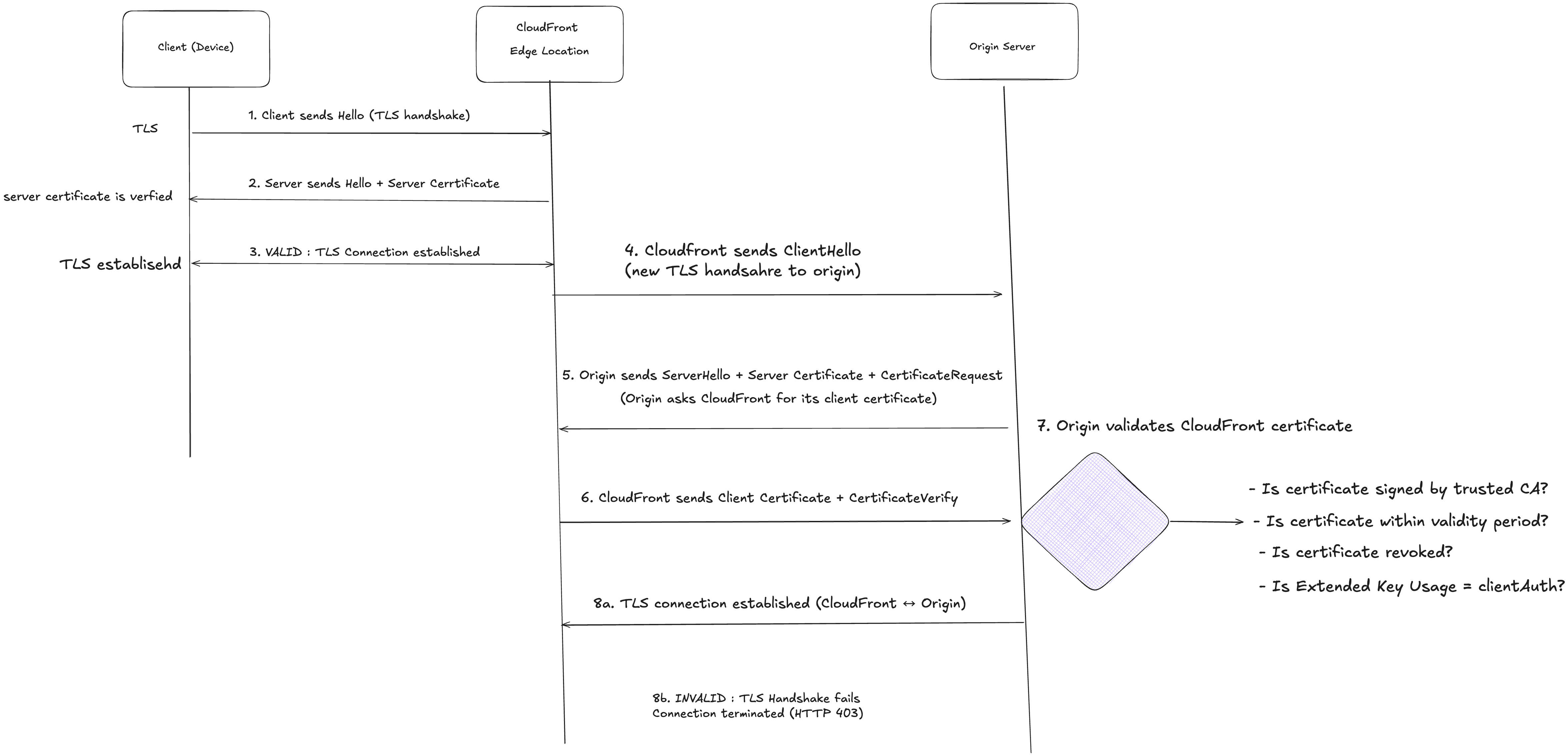
Step-by-step breakdown:
- Client initiates TLS handshake
Sends a ClientHello with supported cipher suites and TLS versions.
- CloudFront responds with server certificate
Sends ServerHello + its server certificate. No CertificateRequest is sent.
- TLS session established
Client verifies CloudFront’s certificate (via public CA). Encrypted HTTPS connection is established.
- CloudFront initiates TLS handshake with the origin:
After receiving a request from the client, CloudFront opens a new TLS connection to the origin and sends a ClientHello message with supported cipher suites and TLS versions.
- Origin responds and requests client certificate:
The origin replies with a ServerHello and its server certificate.If origin mTLS is enabled, it also sends a CertificateRequest message. This is what makes it mutual TLS on the origin side.
- CloudFront presents its certificate:
CloudFront sends its client certificate along with a CertificateVerify message — proving it possesses the private key corresponding to that certificate.
- Origin validates CloudFront’s certificate:
- Checks if the certificate is signed by a trusted CA in its trust store
- Verifies the certificate is within its validity period
- Optionally checks revocation status (CRL/OCSP)
- Ensures the certificate is authorized for clientAuth usage
- Connection decision:
- Valid: TLS handshake completes and an encrypted connection is established between CloudFront and the origin
- Invalid: Handshake fails and the origin terminates the connection
- Request processing (if valid):
The origin processes the request and returns a response to CloudFront, which then forwards it to the client.
Origin mTLS Use Cases #
1. Regulatory Compliance
- Financial services requiring PCI-DSS compliance
- Healthcare systems handling PHI/HIPAA data
- Government systems with FISMA requirements
2. Multi-Tenant SaaS Platforms
- Each tenant has a dedicated origin with mTLS
- CloudFront routes requests based on domain or path
- Origins authenticate CloudFront to prevent unauthorized access
3. Hybrid Cloud Architectures
- On-premises origins that need cryptographic proof of CloudFront identity
- Private data centers exposed only to authenticated CDN nodes
- Legacy systems that cannot be directly exposed to the internet
4. API Gateway Protection
- Backend APIs behind CloudFront with mTLS enforcement
- Prevents direct API access, forcing all traffic through CDN
- Useful for rate limiting and caching at the edge
Viewer mTLS: Securing Client to CloudFront #
Architecture and How It Works #
Viewer mTLS authenticates end users, devices, or API clients to CloudFront. Certificate validation happens at the edge locations, before traffic reaches your origin.
The handshake flow:
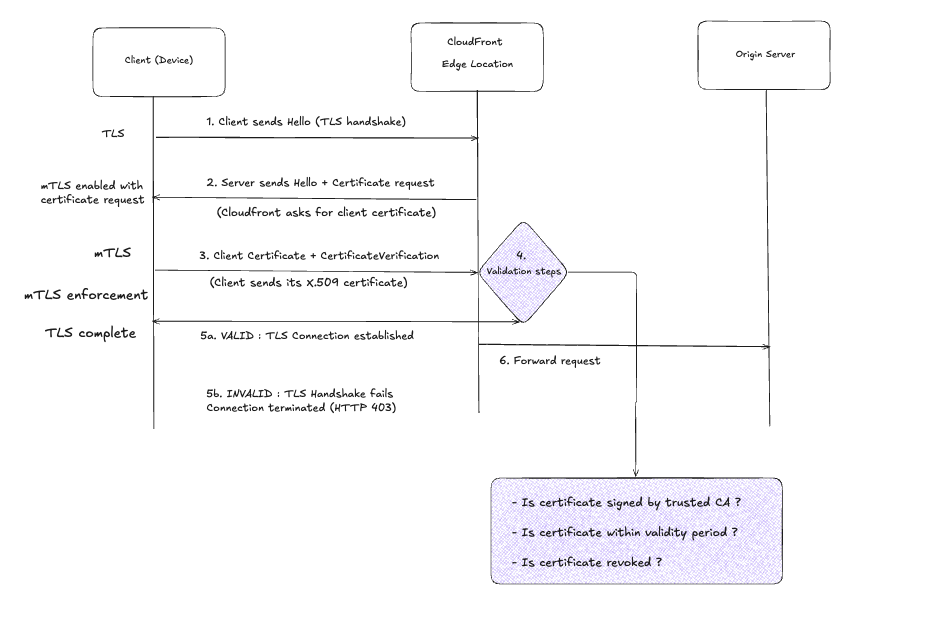
Step-by-step breakdown:
-
Client initiates TLS handshake: Sends a
ClientHellomessage with supported cipher suites and TLS versions. -
CloudFront requests client certificate: Responds with
ServerHellowith server certificate and importantly, sends aCertificateRequestmessage. This is what makes it mutual TLS. -
Client presents certificate: Sends its X.509 certificate and a
CertificateVerifymessage (a signature proving it possesses the private key for that certificate). -
CloudFront validates:
- Checks if the certificate is signed by a CA in the configured Trust Store
- Verifies the certificate is within its validity period (not expired, not not-yet-valid)
- Optionally runs custom validation logic via CloudFront Functions (e.g., checking revocation status, subject name patterns, etc.)
-
Connection decision:
- Valid: TLS handshake completes, encrypted connection established
- Invalid: Handshake fails, client gets rejected (typically HTTP 495 or 403 depending on configuration)
-
Request forwarded to origin (if valid): CloudFront can include metadata about the client certificate in headers sent to your origin for
application layer logging or further authorization.
Viewer mTLS Usecases #
1. IoT Device Firmware Distribution #
Operating a fleet of IoT devices that periodically download firmware updates. Firmware binaries are sensitive assets exposing them publicly increases the risk of reverse engineering, scraping, and uncontrolled distribution.
With mTLS:
- Each device gets a unique certificate during manufacturing
- Firmware distribution endpoint is a CloudFront distribution with mTLS in Verify mode
- Only devices with valid certificates can download updates
- CloudFront caching reduces origin load (millions of devices hitting the same firmware file)
- You can revoke individual device certificates if a device is compromised or decommissioned
2. B2B API Authentication #
Exposing APIs to external business partners introduces a shared trust boundary. API keys and OAuth tokens provide application level authentication, but they do not prevent unauthorized clients from establishing network connections to your edge
With mTLS:
- Issue each partner organization a certificate
- They make API calls via your CloudFront distribution
- Certificate subject contains their organization name for audit logging
- Faster than token validation (happens at TLS layer)
- Partner can use certificate-based auth in their infrastructure (no secrets in env vars)
Configuration Components for Viewer mTLS #
1. Trust Store #
This is a collection of CA (Certificate Authority) certificates that CloudFront will trust. Any client certificate must be signed by one of these CAs to be accepted.
You create a trust store in AWS and upload:
- Your root CA certificate
- Any intermediate CA certificates
If a client shows up with a certificate signed by some random CA, CloudFront rejects it.
2. CloudFront Distribution Configuration #
Configure the distribution with:
-
mTLS Mode:
Verify: All clients must present a valid certificate (strict mode)Optional: Clients can connect with or without a certificate, but if they present one, it must be valid (useful for gradual rollout or mixed environments)
-
Trust Store Association: Link the distribution to the trust store that was created.
3. Certificate Metadata Headers #
CloudFront can forward client certificate details to your origin via HTTP headers:
CloudFront-Viewer-TLS-Client-Subject-DN: Distinguished Name of the certificate subjectCloudFront-Viewer-TLS-Client-Issuer-DN: Certificate issuerCloudFront-Viewer-TLS-Client-Serial-Number: Unique serial number- And more…
Your origin can use these for application-layer logging, analytics, or additional authorization checks.
4. CloudFront Functions (Optional) #
CloudFront Functions run during the connection phase and enable custom validation logic:
- Check certificate revocation status (via Key-Value Store lookups)
- Enforce subject name patterns (e.g., only allow
CN=device-*) - Add custom headers based on certificate attributes
- Implement real-time certificate blocking without CRL/OCSP
Configuration Modes: Verify vs. Optional #
This is an important decision:
Verify Mode (Strict):
- Every single client must present a valid certificate
- No exceptions
- Use this when you’re 100% sure all legitimate clients have certificates
- Example: IoT fleet where every device is provisioned with a cert during manufacturing
Optional Mode (Permissive):
- Clients without certificates can still connect
- If a client does present a certificate, it must be valid
- Use this for:
- Gradual migration (start with optional, move to verify once all clients are updated)
- Mixed environments (some clients use mTLS, others use traditional auth methods)
- Testing in production without breaking existing clients
You can use CloudFront-Functions to implement custom logic based on whether a client presented a cert or not, even in optional mode.
To setup and explore mTLS with cloudfront you will need business or premium plam on aws
Summary #
CloudFront’s dual mTLS capabilities provide cryptographic authentication at both the edge and origin layers, enabling defense-in-depth security architectures.
Key Distinctions:
| Origin mTLS | Viewer mTLS | |
|---|---|---|
| What it does | Authenticates CloudFront to origin | Authenticates clients to CloudFront |
| Trust boundary | CDN ↔ Backend | Client ↔ CDN |
| Certificate holder | CloudFront (in ACM) | Client/Device |
| Validation point | Origin server | CloudFront edge |
| When to use | Protect backend systems from direct access | Enforce device/client identity at edge |
Architectural Takeaways:
-
Origin mTLS: Secures the “last mile” between CloudFront and your backend. Use when origin IPs must remain private or when backend systems require cryptographic proof of CDN identity.
-
Viewer mTLS: Secures the “first mile” between clients and CloudFront. Use when device identity must be validated before traffic enters your infrastructure. Authentication happens at 450+ edge locations globally.
-
Combined Architecture: Layering both creates end-to-end mutual authentication with zero implicit trust between any components. Ideal for regulated industries, zero-trust implementations, or high-security environments.
The shift from application-layer authentication (API keys, JWTs) to TLS-layer authentication (mTLS) moves security enforcement earlier in the request lifecycle, reducing attack surface and eliminating entire classes of vulnerabilities related to token handling.
And as always, keep those private keys safe and Stay secure out there! :)
Supporting links #
-
AWS currently supports : 450+ edge-locations.
-
Viewer mTLS - https://docs.aws.amazon.com/AmazonCloudFront/latest/DeveloperGuide/mtls-authentication.html
-
Origin mTLS - https://docs.aws.amazon.com/AmazonCloudFront/latest/DeveloperGuide/origin-mtls-authentication.html