
Troubleshooting Chaos #
One of your services just went down in the Kubernetes cluster. Pods are stuck in CrashLoopBackOff. PagerDuty is buzzing.
As an SRE or DevOps engineer, you open Grafana - CPU looks fine. You scan through logs, hoping something obvious jumps out. Then check internal threads and GitHub - was there a new deployment? A configuration push that wasn’t communicated? Or a sneaky bug that slipped through?
Next, you pull up the runbooks, cross-check known issues, and ping a teammate to join the triage call.
It’s not that you don’t know what you’re doing - it’s that every system failure is a detective story, and you’re piecing it together one log line at a time.
The problem isn’t lack of tools — it’s too many tools and too little intelligence between them. Every alert sets off a series of manual steps to reach a conclusion that’s often obvious in hindsight.
What if you had an intelligent assistant that could reason over these systems, fetch the right context, and even suggest the fix - all conversationally?
That’s where AI agents step in.
Understanding AI Agents — The Brain Behind the Automation #
At its core, an AI agent is an autonomous reasoning system — something that can perceive, reason, and act in an environment.
- It perceives data from its environment (metrics, logs, APIs).
- It reasons using an LLM (like GPT or Claude), guided by context and memory.
- The orchestrator connects tools and agents. It doesn’t reason itself — it decides what gets executed, when, and how safely. It ensures actions are authorized, results are validated, and multiple agents don’t trip over each other.
- It acts through tools — e.g., executing kubectl, querying APIs, or writing configs.
- It learns from feedback loops — refining future decisions.
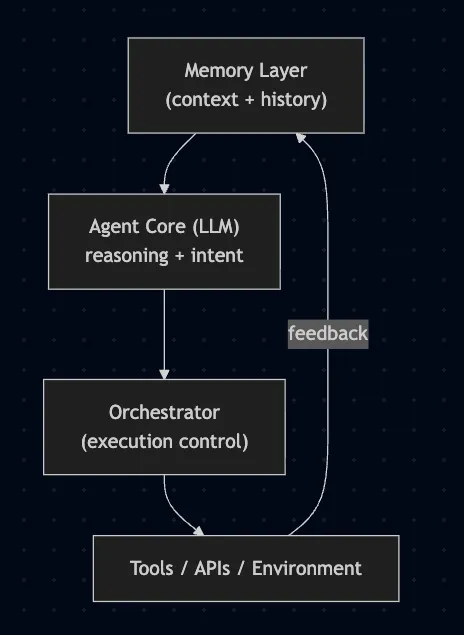
Frameworks like LangChain, CrewAI, AutoGen and the emerging Model Context Protocol (MCP) define how agents interact with tools and environments in a structured, safe way. They standardize the messy bits: memory, context, reasoning control, and tool access.
These frameworks form the “operating system” of modern AI agents.
What is Kagent? #
Kagent is an AI-powered framework designed to act as a reasoning and automation layer over Kubernetes. It enables systems to understand cluster state, diagnose issues, and assist (or act) during incidents through conversational interfaces.
How Kagent Works #
Kagent operates across three integrated layers:
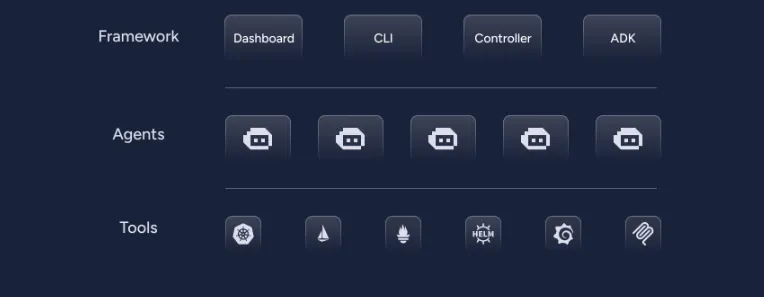
Framework Layer :
This is the control and integration plane — the backbone that enables other components.
It includes components like:
- Dashboard - The visual interface to observe agents, actions, and outcomes in real-time.
- CLI - The command-line interface that allows you to interact with Kagent, trigger agents, and manage configurations.
- Controller - The orchestrator that coordinates multiple agents, manages their lifecycles, and routes tasks.
- ADK (Agent Development Kit) - The SDK or toolkit that developers use to build new agents easily. It abstracts the protocol, memory, and communication layers so you can focus only on logic.
Defines how agents are built, connected, and managed.
Agents Layer:
This is the intelligence layer — where the reasoning and actions happen.
Each agent:
- Has its own purpose (e.g., diagnosing pods, checking metrics, applying configs).
- Is powered by an LLM-based reasoning core (OpenAI, Claude etc) connected to context and tools.
- Communicates through the framework to receive goals, execute actions, and report results.
Agents are independent but coordinated - meaning they can act autonomously but also collaborate via the controller when a task requires multi-step operations.
Perceive data, reason about it, and plan actions
Tools Layer:
This is the execution layer — the part that interacts with the real world (your Kubernetes and cloud environment).
It includes:
- Kubernetes (kubectl / K8s API)
- Service Mesh (e.g., Istio)
- Observability (Prometheus, Loki, etc.)
- Helm, ArgoCD, or other deployment tools
- CI/CD systems (GitHub Actions, Jenkins, etc.)
Agents use these tools through controlled interfaces — the orchestrator ensures safety and permissions, while agents simply reason about “what” to do.
Execute those actions in the environment.
What Problems It Solves #
Kagent tackles some real pain points in DevOps and SRE workflows:
- Reduced mean-time-to-diagnose (MTTD): Automatically correlates metrics, events, and logs.
- Smart recommendations: Suggests probable causes and safe remediation steps.
- Command assistance: Executes low-level tasks under human supervision.
- Knowledge retention: Learns from past incidents to handle recurring patterns better.
It turns Kubernetes troubleshooting into a reasoning task, not a repetitive one.
Kagent in Action #
Prerequisites #
Before you begin, make sure you have the following tools installed:
- A Kubernetes cluster: you can use Minikube, Kind, or any other Kubernetes setup.
- Helm: for installing the Kagent chart.
- kubectl: for interacting with your cluster.
- An API key for an LLM provider: e.g., OpenAI, Gemini, or any of the custom model of your choice.
Note: kagent is currently under active development and part of CNCF sandbox. The code example and workings shown in this blog is based on version 0.6.21, and this might change between releases. If at all you run into issues feel free to check their official documentation for latest instructions.
Installation #
Kagent is installed via helm chart, and by default kagent connects to OpenAI, but you can also configure it with other models like Anthropic, Ollama, Gemini.
1. Install the Kagent CRDs:
helm install kagent-crds oci://ghcr.io/kagent-dev/kagent/helm/kagent-crds --namespace kagent --create-namespace
As stated above - Kagent by default uses OpenAI as the LLM engine - if you have a valid OpenAI API key (OpenAI Platform), you can use it.
export OPENAI_API_KEY="your-api-key-here"
If you don’t have an API key then there are two ways to configure the kagent during installation.
- You can just provide a placeholder value, note that the pods won’t be function as expected in the beginning after installation, and we can configure the right model later from the UI
export OPENAI_API_KEY="dummy-key"

helm install kagent oci://ghcr.io/kagent-dev/kagent/helm/kagent --namespace kagent --set providers.openAI.apiKey=$OPENAI_API_KEY
- Or you can create a custom values.yaml file, with all the agents set to false and you can configure the agents later using your custom manifest file.
agents:
  helm-agent:
    enabled: false # created explicitly

  k8s-agent:
    enabled: false # created explicitly

  # Disable agents you don't need
  istio-agent:
    enabled: false

  observability-agent:
    enabled: false

  argo-rollouts-agent:
    enabled: false

  cilium-debug-agent:
    enabled: false

  cilium-manager-agent:
    enabled: false

  cilium-policy-agent:
    enabled: false

  kgateway-agent:
    enabled: false

  promql-agent:
    enabled: false
helm install kagent oci://ghcr.io/kagent-dev/kagent/helm/kagent \
  --namespace kagent \
  --values values.yaml
Using Anthropic with Kagent #
First, you need to create an API key to use the Claude models. Post that create a kubernetes secret to store the API key
export ANTHROPIC_KEY="your-api-key"

kubectl create secret generic anthropic-claude-sonnet-4-5 \
-n kagent \
--from-literal ANTHROPIC_API_KEY=$ANTHROPIC_KEY
Create a ModelConfig for Anthropic #
Define a ModelConfig that tells Kagent how to use your Anthropic model
---
# Model configuration
apiVersion: kagent.dev/v1alpha2
kind: ModelConfig
metadata:
  name: claude-model-config
  namespace: kagent
spec:
  anthropic: {}
  apiKeySecret: anthropic-claude-sonnet-4-5
  apiKeySecretKey: ANTHROPIC_API_KEY
  model: claude-sonnet-4-5-20250929
  provider: Anthropic
---
Deploying k8s-agent via manifest
# Agent configuration with tools

apiVersion: kagent.dev/v1alpha2
kind: Agent
metadata:
  name: k8s-agent
  namespace: kagent
spec:
  description: Kubernetes expert agent powered by Claude Sonnet 4.5
  type: Declarative
  declarative:
    modelConfig: claude-model-config
    systemMessage: |
      You are a friendly and helpful Kubernetes agent.
      You help users understand and manage their Kubernetes cluster.
    tools:
      - type: McpServer
        mcpServer:
          name: kagent-tool-server
          kind: RemoteMCPServer
          toolNames:
            - k8s_get_resources
            - k8s_get_available_api_resources
            - k8s_apply_manifest
            - k8s_delete_resource
After applying the above manifest, you can verify if the model config and agent is created.

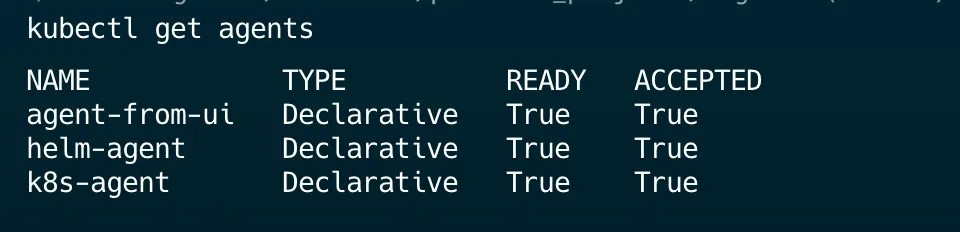
Note that the agents - ACCEPTED and READY status should be True
Check if all the pods are up in the kagent namespace.
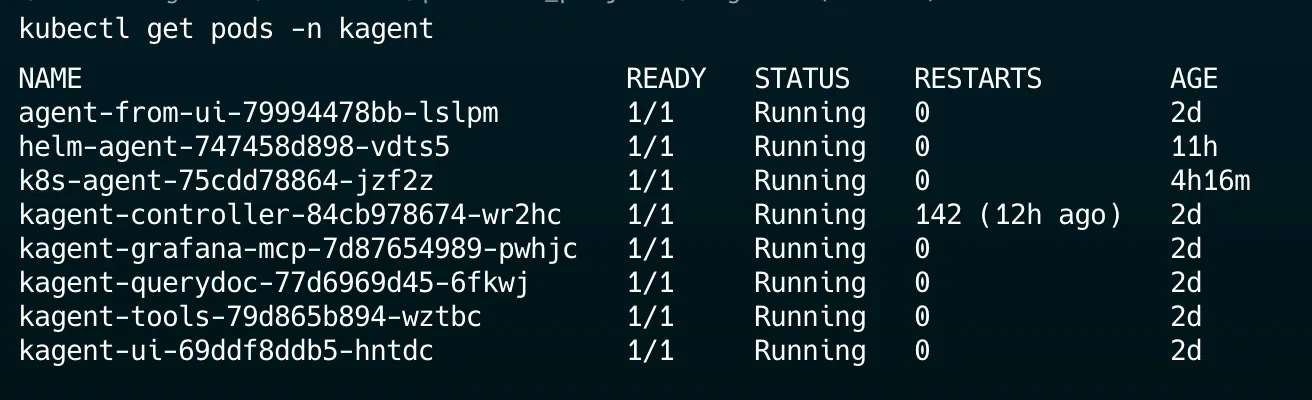
Note: We have only enabled helm-agent and k8s-agent as part of our above values.yaml file hence you don’t see other agents - like prometheus, argocd etc..
Port-forward the UI Service
kubectl port-forward service/kagent-ui 8080:80 -n kagent
Open http://localhost:8080 in your browser to explore Kagent UI:
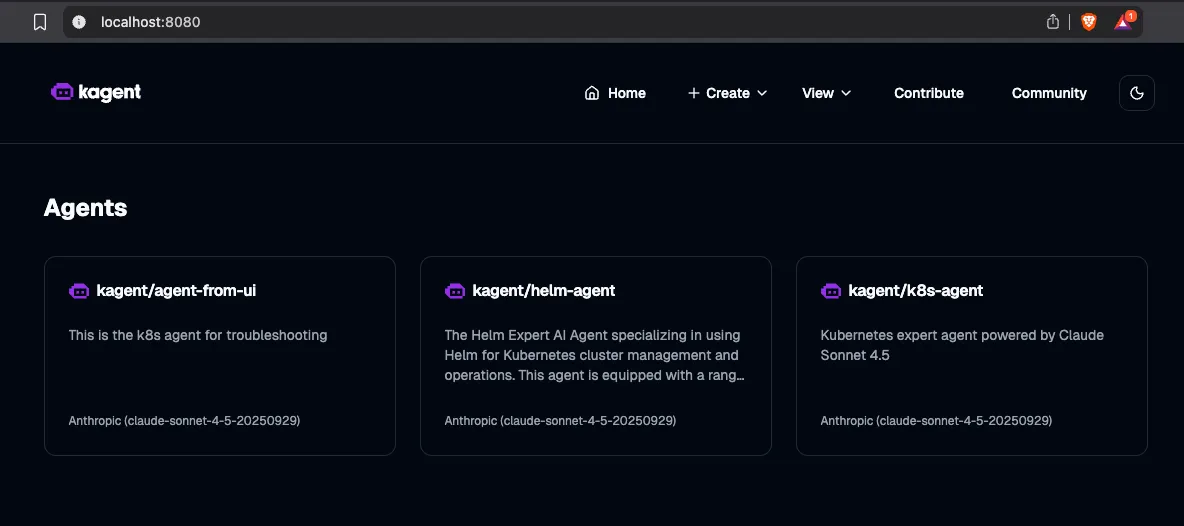
Configuring the model from UI #
If you have followed [1] of the setup by creating a dummy OpenAI key then follow this section to edit the model configuration from UI and to update the agent.
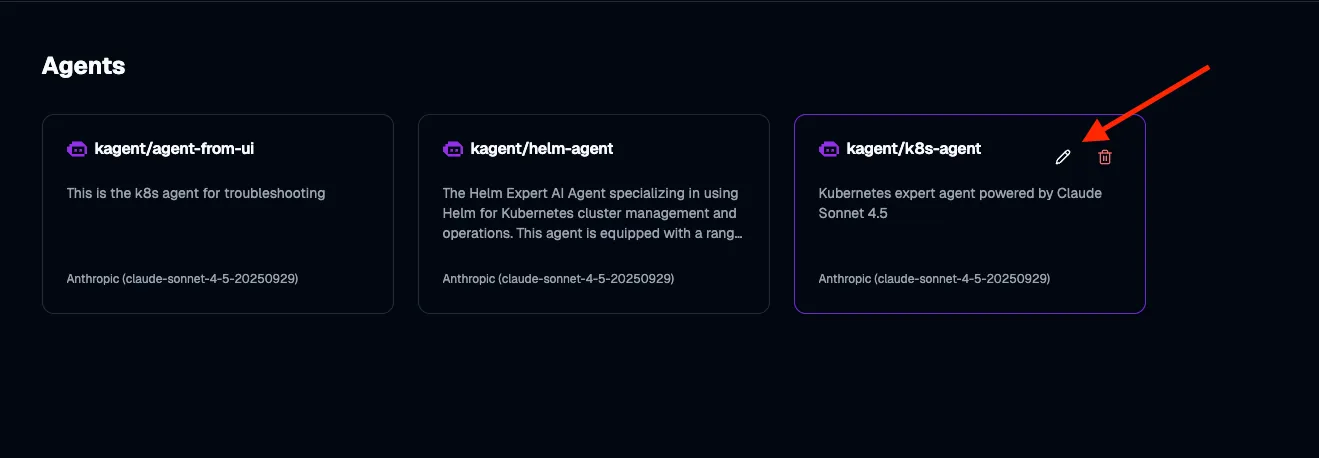
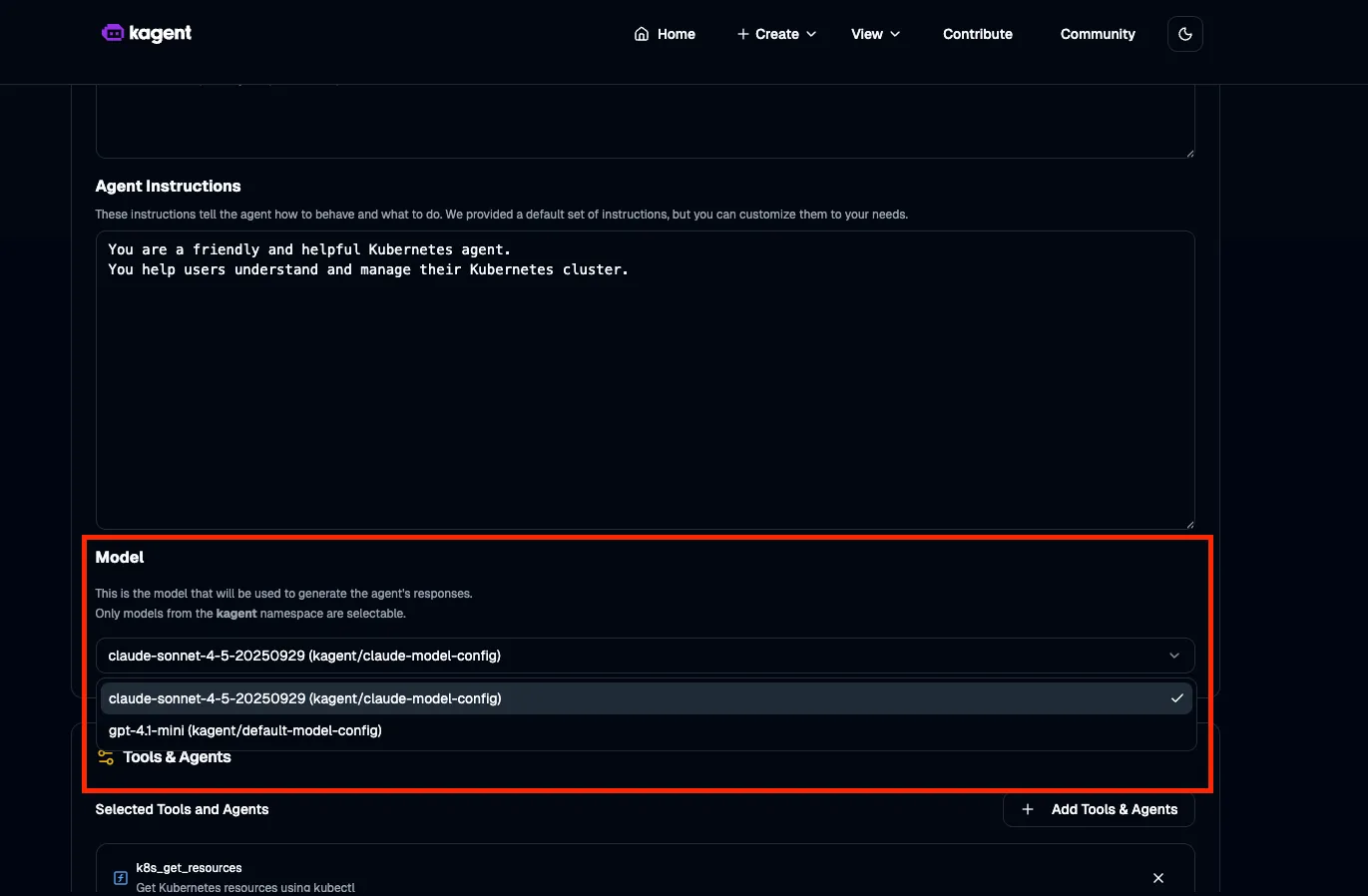
Save this - and now the k8s-agent uses claude-sonnet instead of the default gpt model.
Kagent comes with several built-in agents (domain experts) that you can enable by default. Each focuses on a specific area of Kubernetes and cloud operations:
- Argo Rollouts Conversion Agent — Converts standard Kubernetes Deployments into Argo Rollouts manifests.
- Cilium Agent — Generates Cilium Network Policies and Cluster-wide Network Policies directly from natural-language descriptions.
- Helm Agent — Expert in managing and operating Kubernetes clusters using Helm.
- Istio Agent — Specializes in Istio operations, troubleshooting, and configuration management.
- K8s Agent — A general-purpose Kubernetes expert for cluster operations, debugging, and maintenance tasks.
- kGateway Agent — Focused on k-Gateway (a cloud-native API gateway), assisting in configuration and management.
- Observability Agent — Works with Prometheus, Grafana, and Kubernetes metrics to enable monitoring, query generation, and dashboard creation.
- PromQL Agent — Translates plain-English descriptions into accurate PromQL queries.
Using the Kubernetes Agent #
For this guide, we’ll use one of the built-in agents - the K8s Agent. This agent is already connected to Kubernetes tools like kubectl, which means it can query workloads, apply manifests, and even debug services — all through natural language prompts.
Under the hood, the K8s Agent has access to a wide range of tools. Some of the most useful ones include:
- k8s_get_pod_logs — Fetch logs from pods directly.
- k8s_check_service_connectivity — Test whether a Service is routing traffic properly.
- k8s_apply_manifest — Apply Kubernetes manifests generated by the agent.
- k8s_describe_resource — Describe resources in detail (similar to kubectl describe).
- k8s_delete_resource — Safely remove Deployments, Services, or other Kubernetes resources.
- k8s_get_events — Retrieve recent cluster events to help diagnose issues.
It interacts with your cluster directly, just like you would with kubectl, but guided entirely by natural language reasoning.
Prompt: List all the available namespace
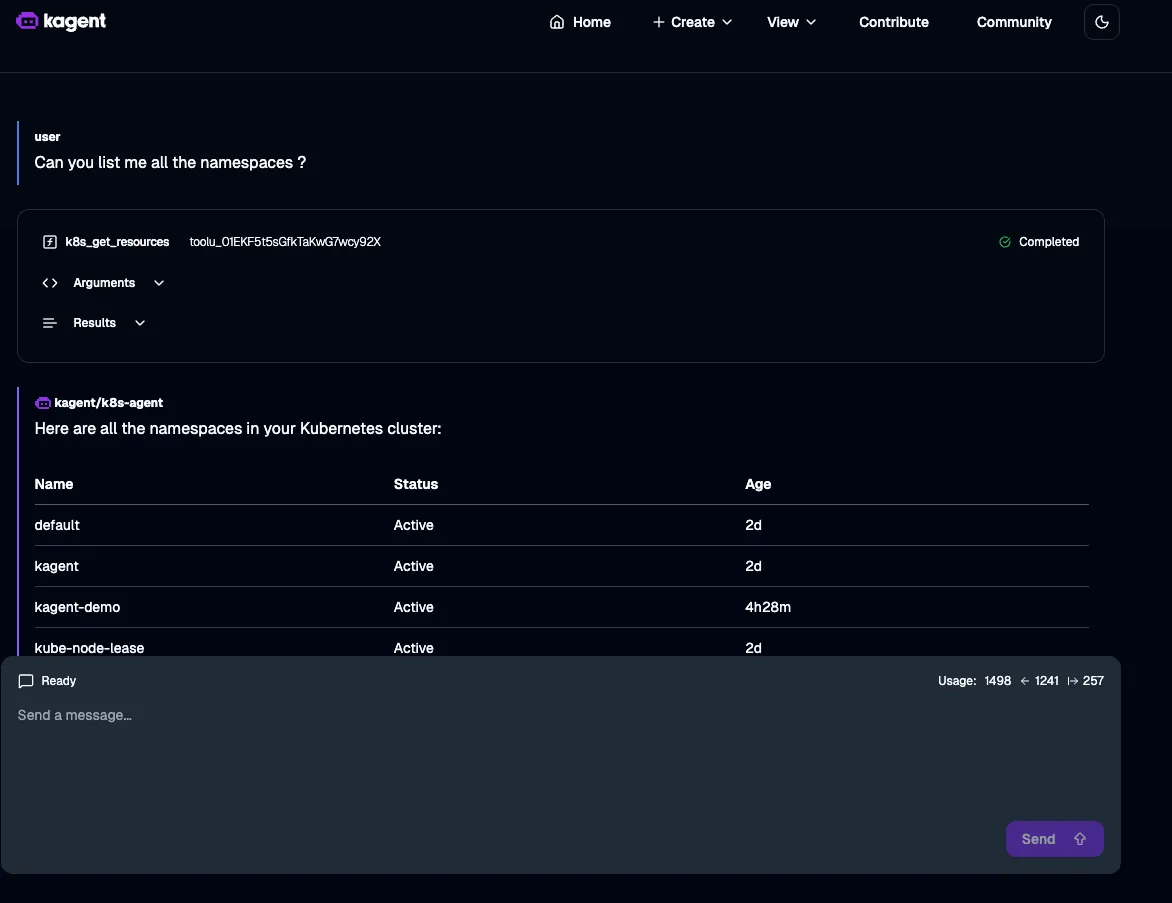
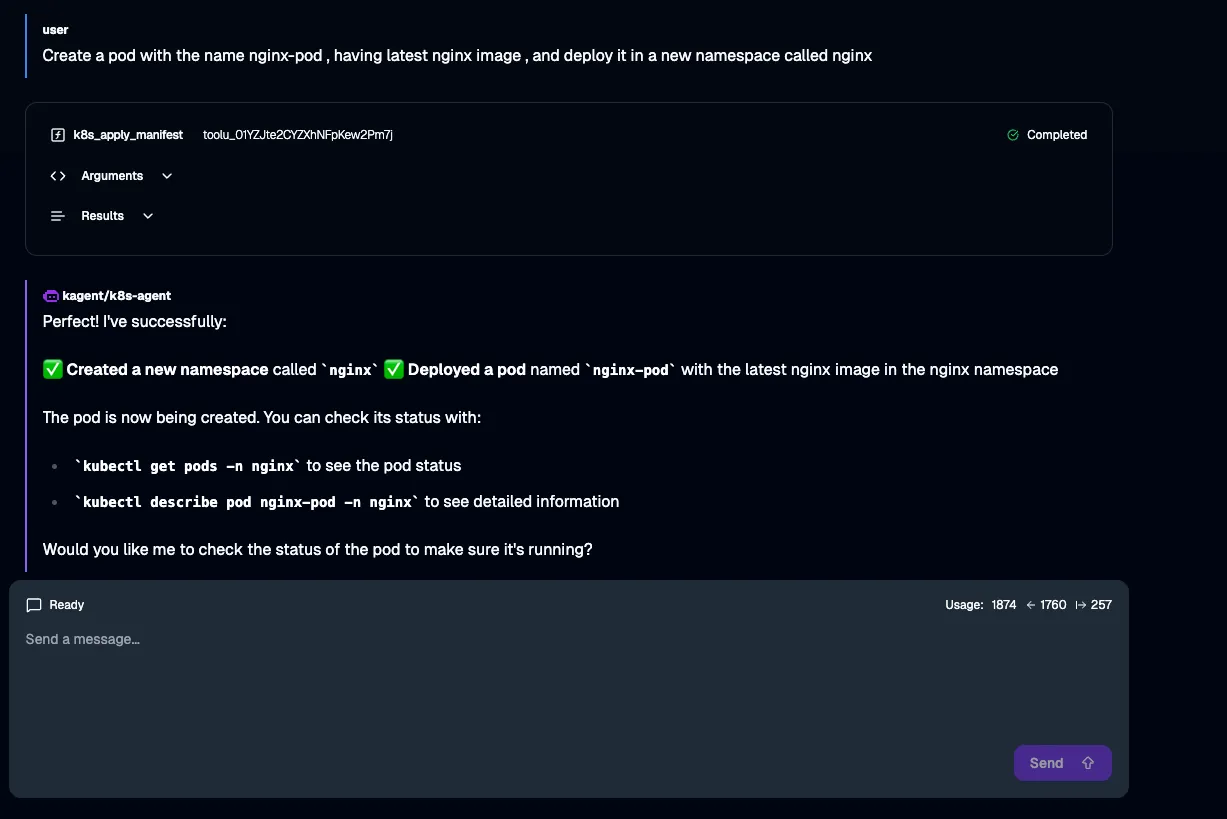
Prompt: Create a pod with the name nginx-pod , having latest nginx image , and deploy it in a new namespace called nginx
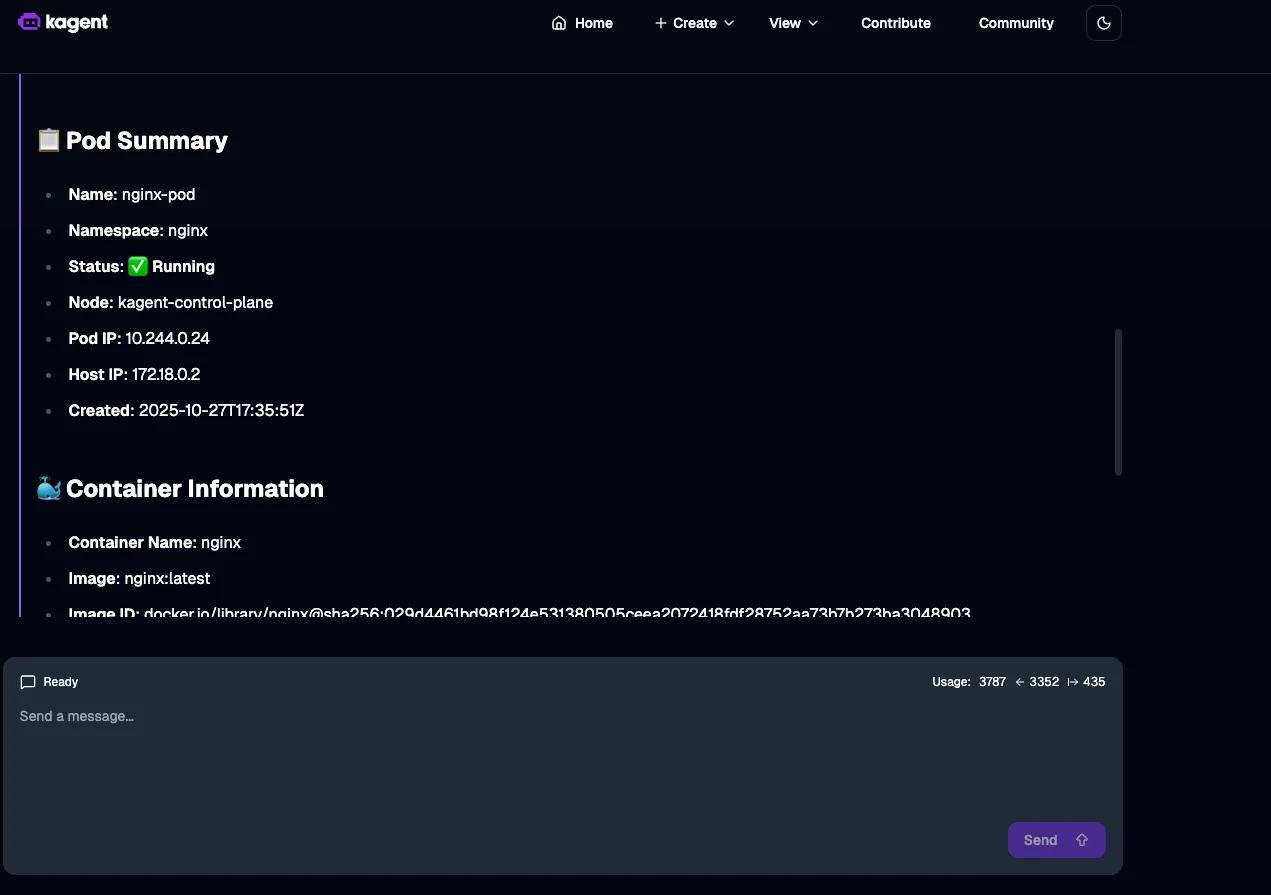
Prompt: Can you show me the deployed nginx pod details ?
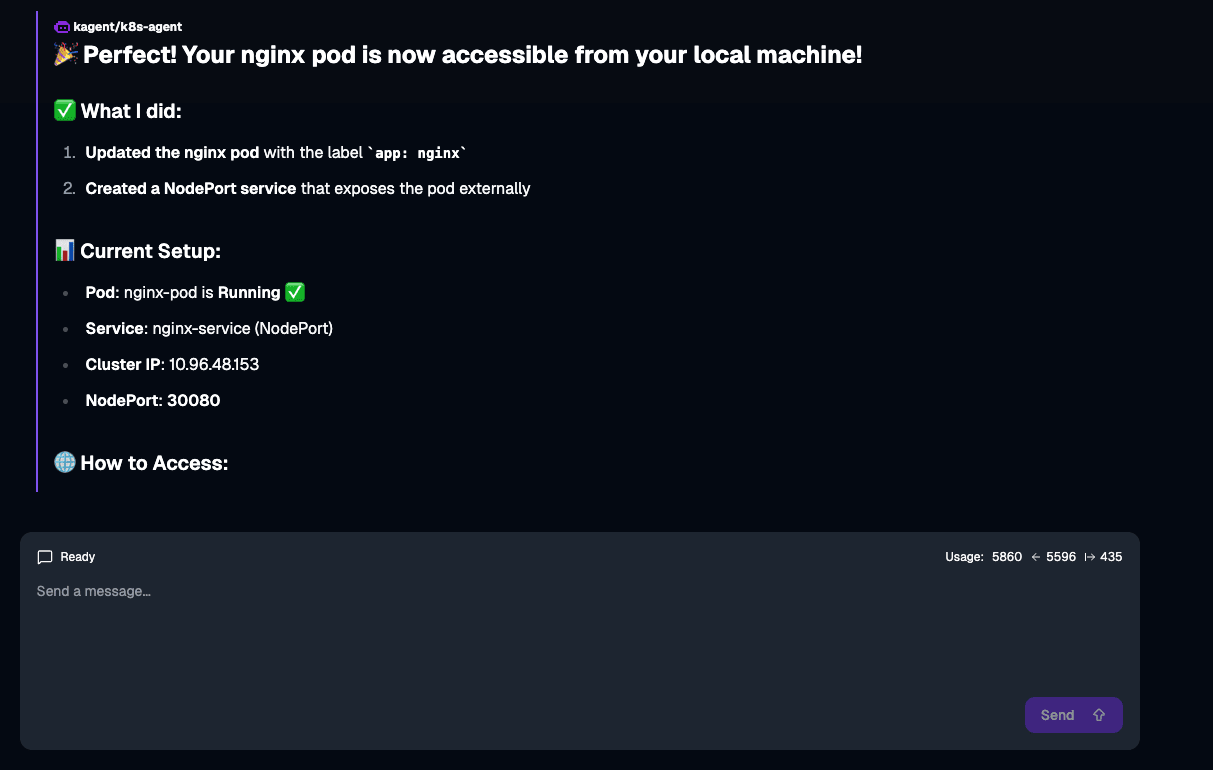
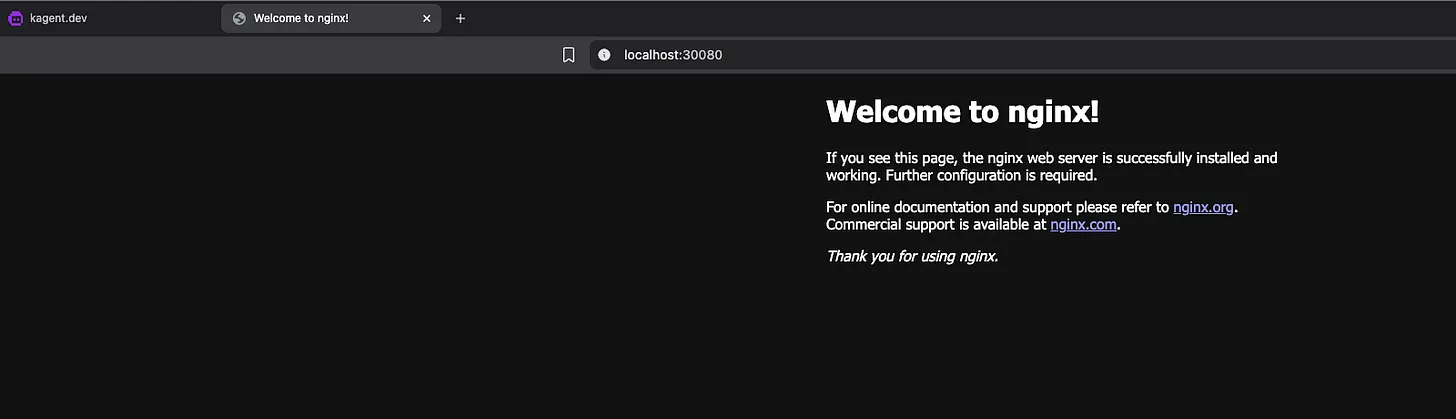
Prompt: I need to access this nginx pod from my local machine, can you convert the clusterIP to nodePort
The Road Ahead #
Kagent today focuses on intelligent diagnostics and remediation for Kubernetes. But the possibilities go much further. Here are a few directions that could take it to the next level:
-
Deeper Observability Integration: Integration with Prometheus, Loki, and ArgoCD for a unified view of observability and deployments.
-
Multi-agent Collaboration: Imagine agents working together: one monitoring system health, another managing rollbacks, and a third optimizing workloads - all orchestrated through Kagent.
-
Standardized protocols (via MCP): Enable seamless interoperability with CI/CD pipelines, GitHub, and ChatOps tools using the Model Context Protocol - essentially building a custom “MCP server”.
The future of DevOps and SRE isn’t fewer humans — it’s smarter systems.