
RAG, MCP, A2A, and Subagents: Making Sense of different AI Architectures #
Modern AI architectures are filled with terms like RAG, MCP, A2A, and subagents. They’re often explained independently, which makes them feel like competing ideas.
In reality, they solve different layers of the same architectural problem:
- How knowledge is injected
- How capabilities are exposed
- How workflows are coordinated
- How reasoning is decomposed
This post builds a clear mental model for understanding where each pattern fits — and when to use it.
Why Do These Patterns Exist? #
The fundamental issue:
Large language models are trained on static data. They don’t know what’s inside your company’s documentation. They can’t query your database. They don’t have awareness of yesterday’s production outage. And they cannot directly take action in external systems create a ticket, send an email, deploy code.
This creates a structural gap between what a model knows and what it must access or execute to be useful in real-world systems.
The brute-force solution would be to constantly retrain models on new data internal documents, databases, news, logs. In practice, this is expensive, slow, and operationally impractical. Retraining is not a scalable strategy for dynamic knowledge or live system interaction.
RAG, MCP, A2A, and subagents are all different ways of bridging that gap. They are not competing solutions, they solve different aspects of the same underlying constraint.
RAG: Retrieval-Augmented Generation #
The Core Idea #
Instead of expecting the model to know everything, you fetch relevant information at query time and include it in the prompt.
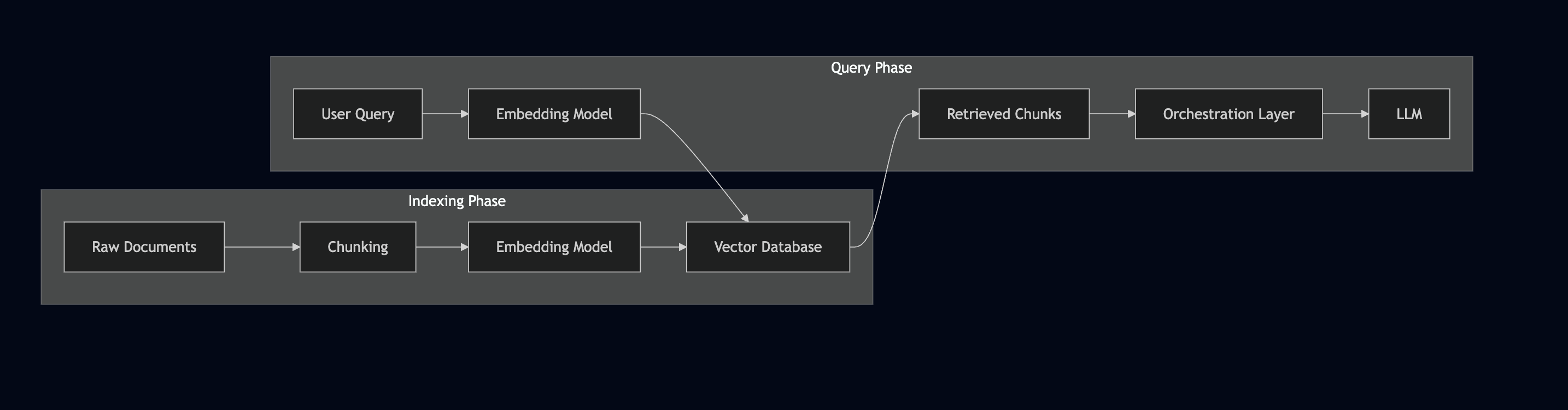
The flow looks like this:
User Question → Find Relevant Documents → Feed Documents + Question to LLM → Answer
The “find relevant documents” step usually involves a vector database. You convert your documents into embeddings (numerical representations), store them, and when a query comes in, you find documents with similar embeddings.
Realworld Example #
Imagine you’re building a support assistant with 10,000 help articles.
The model doesn’t know your product documentation. Fine-tuning the model on all articles would be expensive, slow to update, and operationally heavy. Even if you tried to include everything in the prompt, the context window wouldn’t allow it.
With RAG, the architecture changes:
- All help articles are indexed into a vector database.
- A user asks a question.
- The system retrieves the top relevant articles.
- Only those articles are inserted into the prompt.
- The model generates a grounded response.
Instead of compressing 10,000 documents into model weights or prompt tokens, you narrow the context dynamically to what matters for that query.
The model remains general purpose, the knowledge lives in the retrieval layer.
Where RAG Gets Tricky #
Chunking problems:
If documents are split poorly, meaning gets fragmented. Chunk A might match the query semantically, but the actual answer lives in Chunk B.
The model receives incomplete context and produces a partially correct but misleading answer. Chunking is not just splitting text. It’s preserving semantic boundaries.
Semantic mismatches:
Users and documentation rarely use the same language.
User asks "how do I get my money back?" but your docs say "Refund Process." . If embeddings fail to capture that equivalence, retrieval quality drops.
Noisy retrieval:
Retrieving too many “somewhat relevant” chunks results unneccessary context to process which increases token budgets.
Multi-hop questions:
Some queries require combining information from multiple documents.
"What's the refund policy for enterprise customers in APAC?" might need information from multiple documents that aren’t obviously connected.
The solutions involve better chunking strategies, hybrid search (combining semantic search with keyword matching), re-ranking results before feeding them to the model, and sometimes multiple retrieval rounds.
Advanced Retrieval Patterns #
- Hybrid search: Combining vector similarity with traditional keyword matching (BM25)
- Re-rankers: Using a separate model to re-score retrieved documents
- Query expansion: Generating multiple variations of the query to improve recall
- Agentic RAG: Letting the model decide when to retrieve and what to search for
Opensource RAG ecosystem #
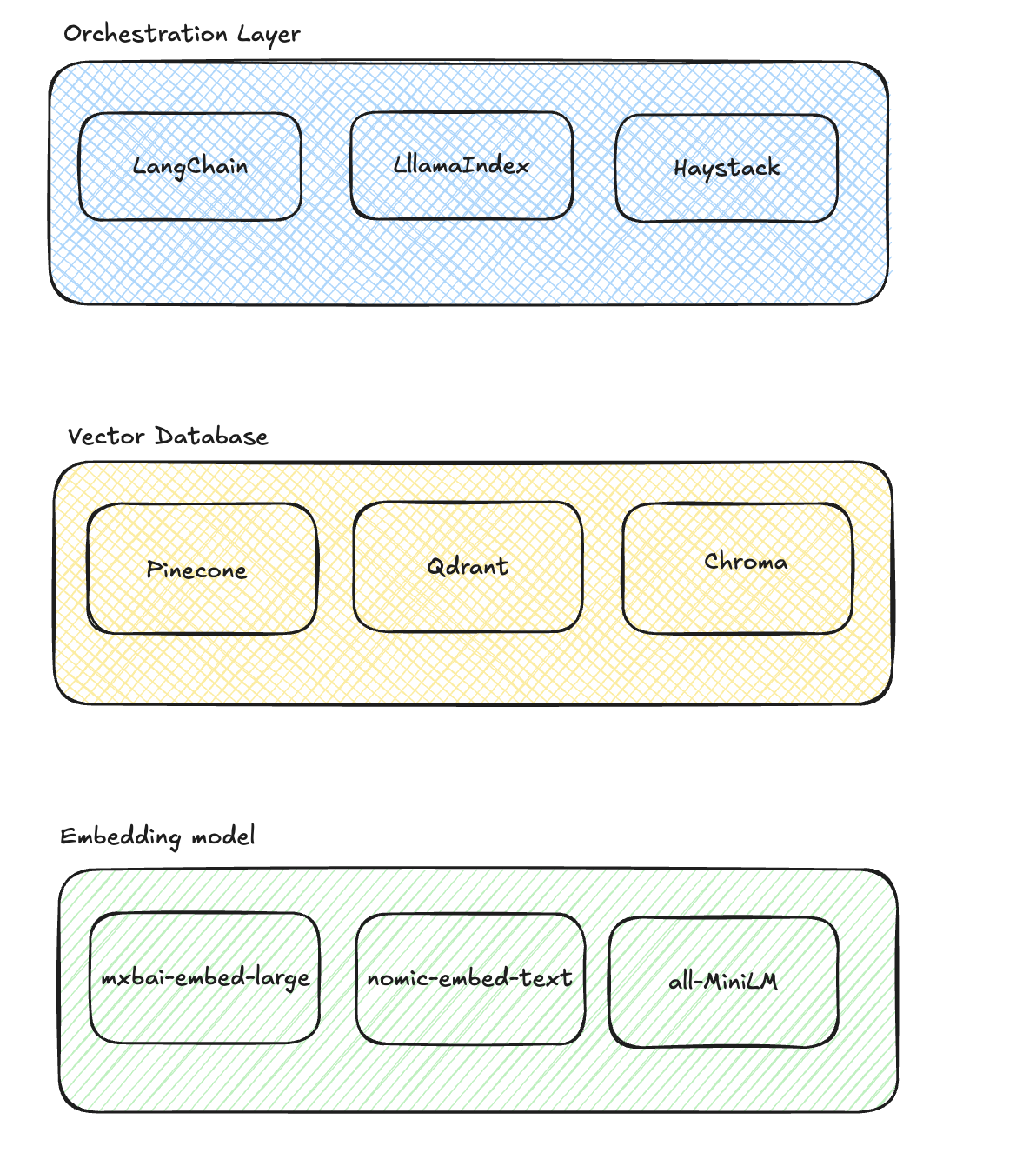
RAG Phases #
MCP: Model Context Protocol #
The Problem It Solves #
Consider an AI assistant that needs to access Slack messages, query a database, check calendar availability, and interact with an internal API. Each integration needs custom code, different authentication, different ways of formatting the context.
Over time, this becomes brittle. Tool definitions drift. Schemas change. Security boundaries blur. The model’s ability to interact with external systems depends on fragile, hand-written glue code.
MCP (Model Context Protocol) is is a protocol designed to standardize how models access tools and external data sources.
How It Works #
Think of MCP servers as adapters:
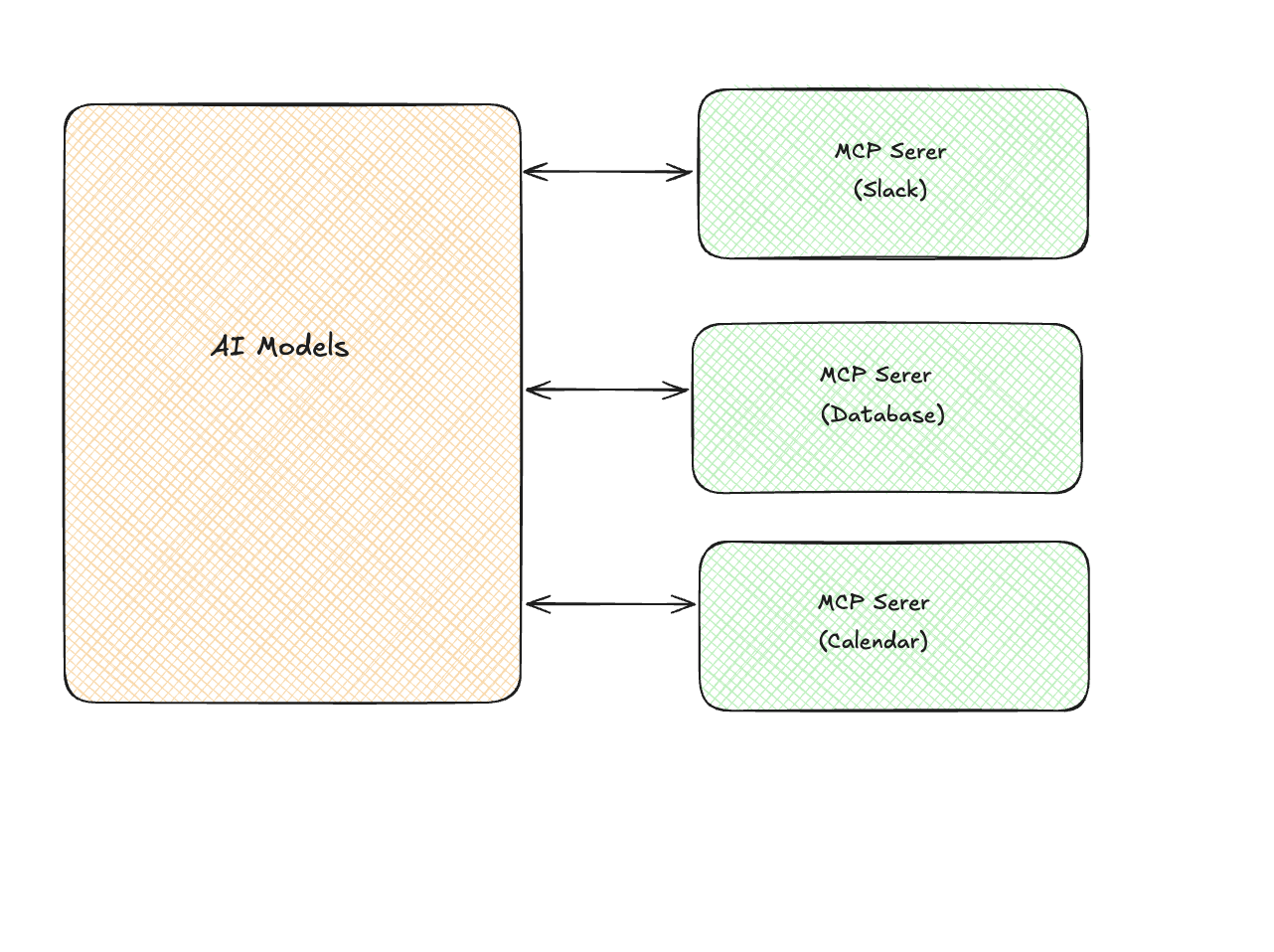
Each MCP server exposes three things:
- Resources: Data the model can read (files, records, API responses)
- Tools: Actions the model can take (send message, create event, run query)
- Prompts: Pre-built prompt templates for common tasks
Why This Matters #
- Reusability: Once an MCP compatible server exists for a service, it can be reused across applications and models without custom integration code.
- Composability: New capabilities can be added by registering additional MCP servers rather than rewriting orchestration logic.
- Standardized security: Authentication, permissions, and access controls are enforced consistently at the protocol layer instead of being embedded in prompts.
- Context management: The protocol handles how much context to send
MCP vs Traditional Tool Use #
At first glance, MCP may look similar to standard function calling.
The difference is not capability — it is standardization and separation of concerns. MCP creates an ecosystem
Traditional tool use is typically:
- Defined inside the application
- Tightly coupled to a specific model integration
- Custom per deployment
- Manually maintained
MCP introduces a protocol layer between models and tools:
- Tools expose structured schemas
- Capabilities can be discovered dynamically
- Invocation formats are consistent
- Implementations are reusable across environments
Read more about MCP here - https://www.thequietkernel.com/engineering/inference-engineering/19-10-2025-mcp/
A2A: Agent-to-Agent Communication #
Moving Beyond Single Agents #
Most AI applications follow a simple interaction model:
User → Model → Response
This works well for bounded tasks. But as workflows become more complex, a single agent quickly becomes overloaded.
Tasks involving planning, research, analysis, execution, and validation often require different reasoning strategies, tool access patterns, and context scopes. Forcing all of this into one agent increases complexity and reduces reliability.
Agent-to-Agent (A2A) communication introduces coordination between multiple specialized agents. Instead of one monolithic reasoning loop, you have cooperating agents with clearly scoped responsibilities.
Coordinator → Delegate → Execute → Return → Aggregate
Why Multiple Agents? #
Context constraints:
LLMs operate within finite context windows. As tasks expand, maintaining all relevant information in a single agent becomes inefficient and error-prone. Splitting responsibilities reduces context pressure and improves clarity of reasoning.
Specialization:
Different tasks benefit from different configurations:
- A research agent optimized for retrieval heavy workflows
- A coding agent configured with execution tools
- A planning agent focused on task decomposition
Separating these roles allows each agent to operate under tuned constraints instead of forcing one configuration to handle everything.
Parallelism:
Independent subtasks can execute concurrently.
For example:
- One agent gathers logs.
- Another analyzes metrics.
- A third drafts a summary.
Parallel execution reduces latency for multi step workflows.
Modularity:
With separate agents, improvements can be isolated. Changes remain localized instead of destabilizing a single monolithic agent
Common Patterns #
Hierarchical (Orchestrator → Workers)
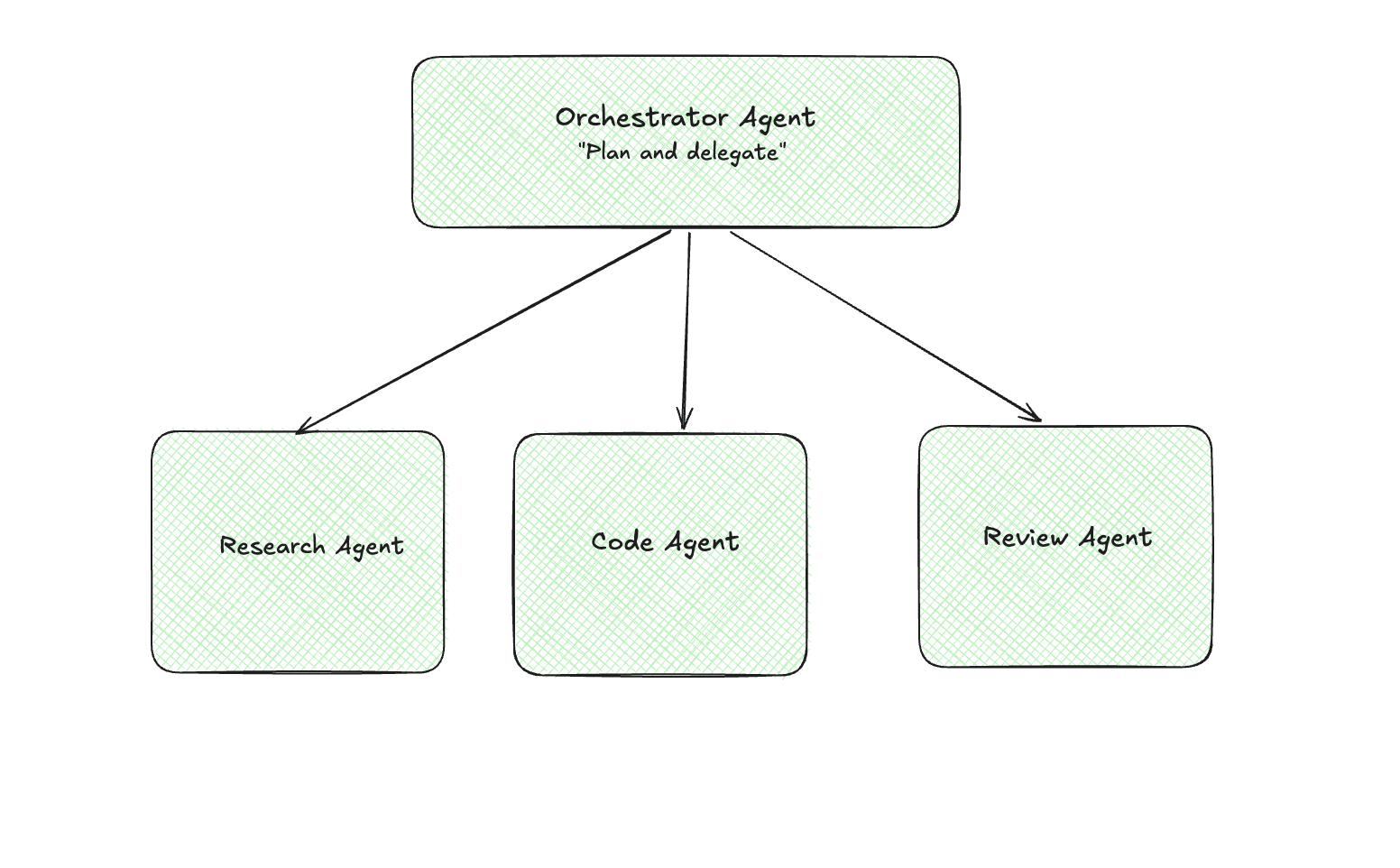
One agent breaks down the task and delegates to specialists.
Pipeline (Sequential)
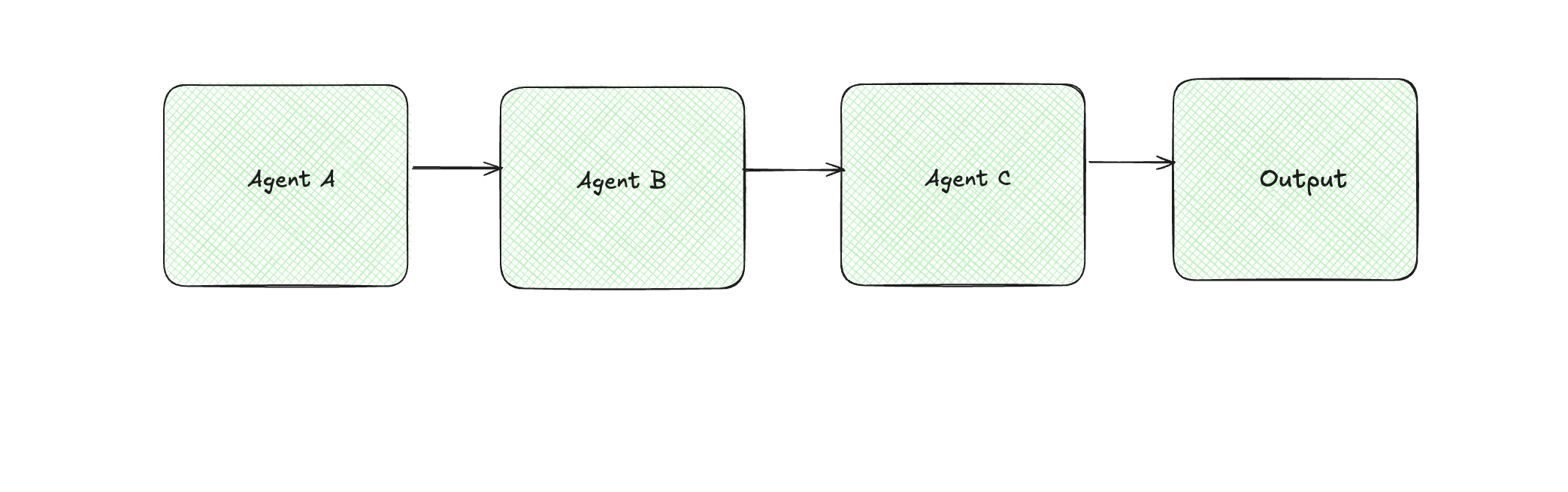
Each agent does its part and hands off to the next.
Collaborative (Peer-to-Peer)
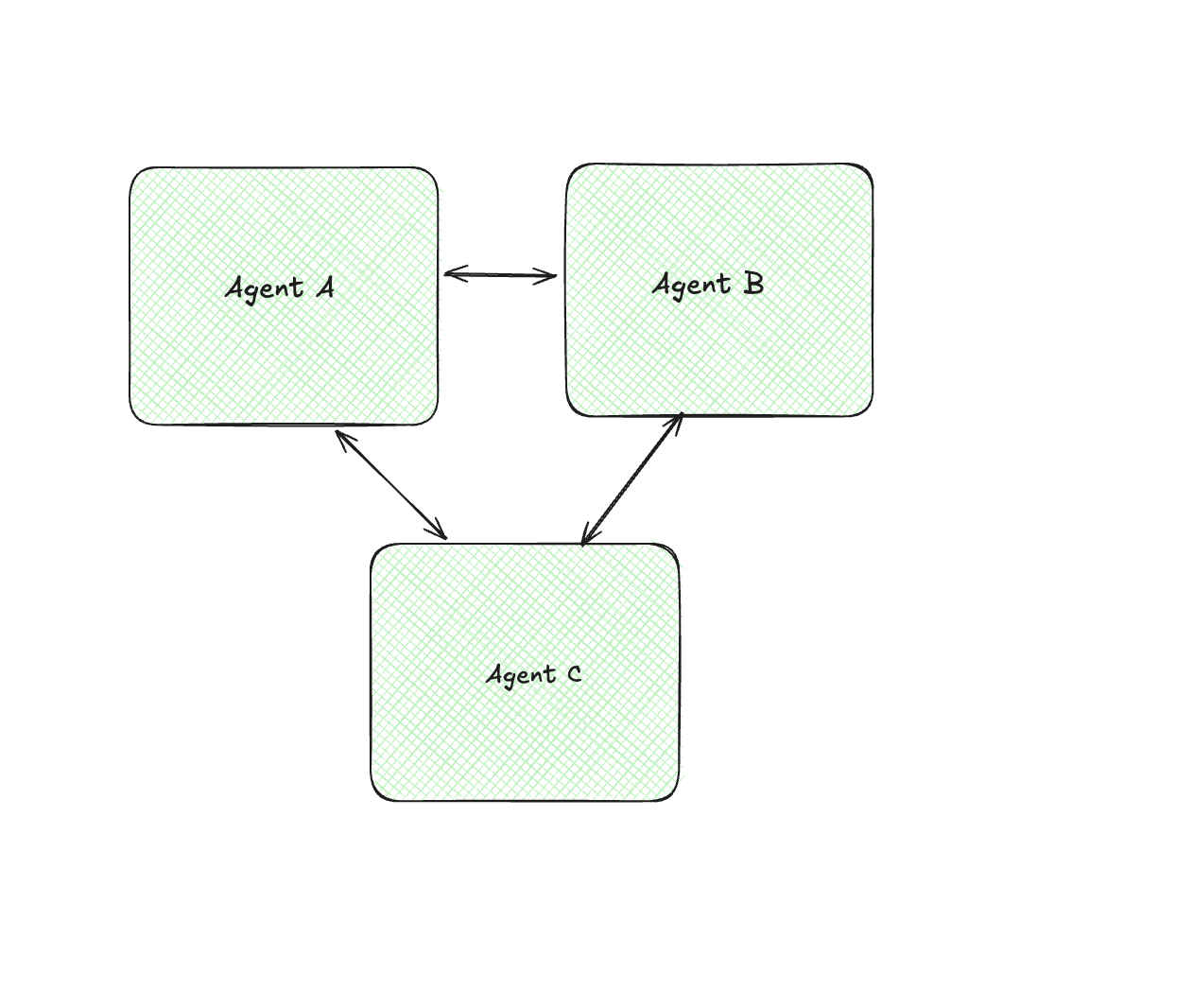
Agents discuss, debate, or build on each other’s outputs. This is mostly seen in brainstorming or review processes.
When Multi-Agent Makes Sense #
- The task decomposes naturally into clearly defined subtasks (e.g., retrieval, analysis, synthesis).
- Subtasks can execute in parallel, reducing overall latency.
- Different stages require different model configurations (e.g., a retrieval-optimized agent vs. a code-execution agent).
- Context would be too large for a single agent
- Isolation improves reliability, allowing failures to be contained within specific agents.
When Multi-Agent Architectures Are Unnecessary #
It probably doesn’t make sense when:
- A single well-designed prompt achieves acceptable results.
- The coordination overhead outweighs performance gains.
- Simplicity is critical for debugging and operational clarity.
Subagents: Parent-Child Task Delegation #
What Makes Subagents Different #
Subagents are a constrained form of multi-agent architecture. Unlike peer-to-peer agent collaboration, subagents operate within a clear parent–child hierarchy. A primary agent spawns child agents for specific tasks, then synthesizes their results.
The Structure #
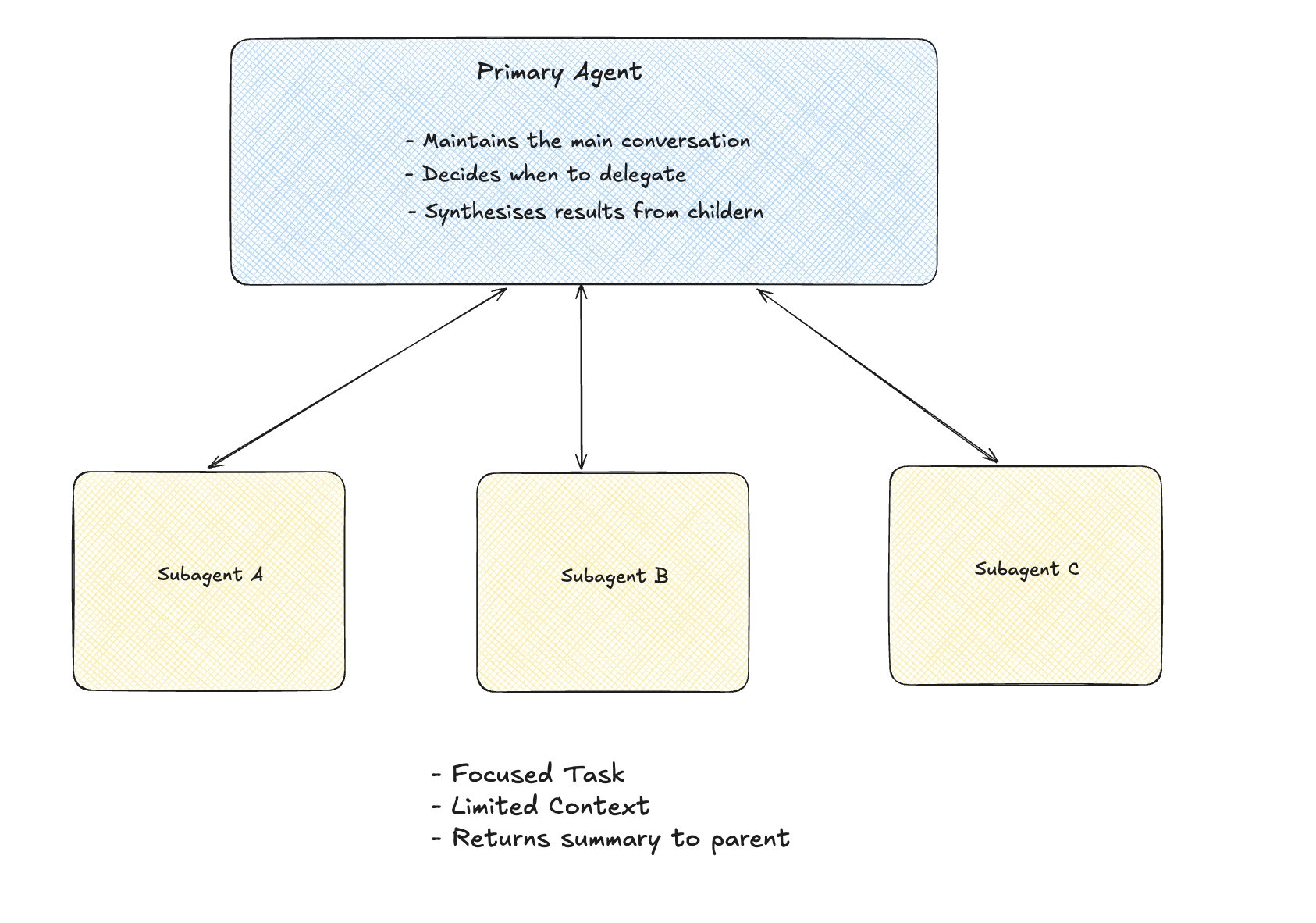
A Concrete Example #
When Claude Code needs to understand a codebase:
User: "How does authentication work in this project?"

Primary Agent:
├── Spawns: Explore subagent
│   ├── Task: "Find auth-related files and trace the flow"
│   ├── Has access to: file search, file read
│   └── Returns: Summary of auth system + key file paths
│
├── Receives summary (not all the file contents)
│
└── Responds to user with explanation
The primary agent doesn’t need to see every file the subagent read. It gets a distilled summary.
explore subagents in claude - https://code.claude.com/docs/en/sub-agents#explore
Putting It All Together #
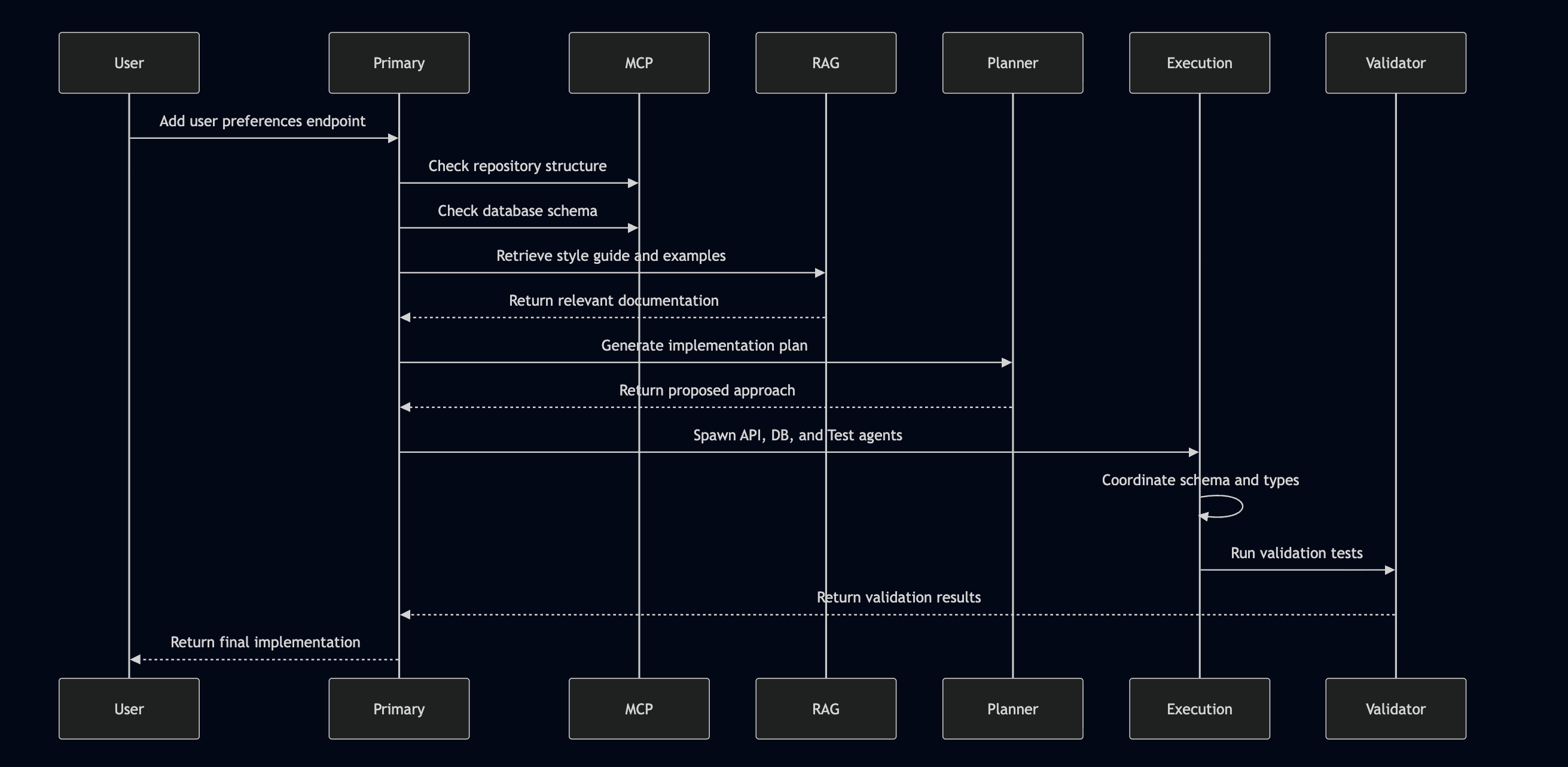
These patterns are not competing ideas. They operate at different layers of an AI system:
- RAG extends knowledge.
- MCP standardizes capability access.
- Subagents decompose complex reasoning.
- A2A enables coordination between agents.
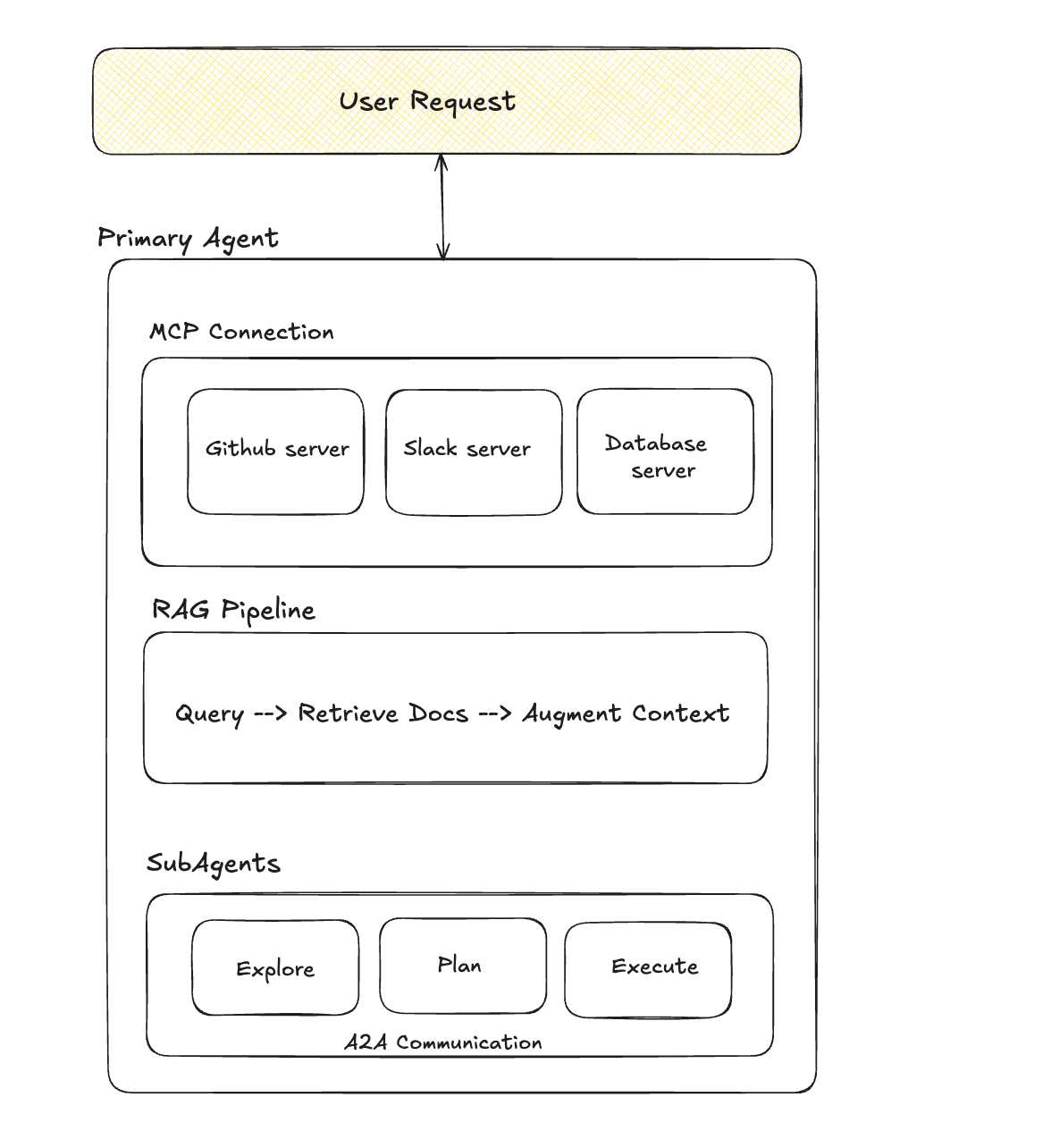
Sequence diagram for the above. #
When to Use What #
Here is a useful mental model is to treat each pattern as solving a different class of problem: knowledge access, capability access, task decomposition, and distributed coordination.
RAG — When the Problem Is Knowledge #
The model must reference internal or domain-specific documents and Information changes frequently and retraining is impractical.
When you require grounded answers for your questions and to reduce model hallucinations. And you want to efficiently utilise the context window limit
Avoid RAG when the task is self contained and does not depend on external knowledge.
MCP - When the Problem Is Capability #
The system must interact with external services (GitHub, Slack, databases, APIs). with reusable, standardized integrations. You are building on platforms that support protocol based tool access.
Subagents - When the Problem Is Cognitive Complexity #
Tasks decompose naturally into distinct stages. Different subtasks require different model configurations.
When there is context limits constrain a single agent approach and you want to improve the output quality improves with planning, execution, and validation loops, with parallel execution that can reduce latency.
Avoid subagents when a single structured prompt produces reliable results.
A2A - When the Problem Is System Coordination #
Multiple agents must collaborate or delegate tasks dynamically. Agents originate from different domains or providers. For example, a travel system where a flight booking agent and a hotel booking agent coordinate to produce a unified itinerary.
Avoid A2A when centralized orchestration is sufficient and simplicity is a priority.